Phone Validation
Confirm that phone numbers submitted through your forms are real, active, and of the line type you require.
Credits Required
Phone validation is available on all plans, including free. Paid plans include a monthly credit allowance; free plan users can purchase credits manually. See Validation Credits for details.
Basin checks each phone number through SpamCheck.ai, which queries live carrier data to verify the number's status and line type. Each successful check consumes one validation credit.
Enabling Phone Validation
- Open your form and go to Settings → Spam
- Scroll to the Phone Validation section
- Toggle Enable Phone Validation on
- Configure the options below
- Click Save
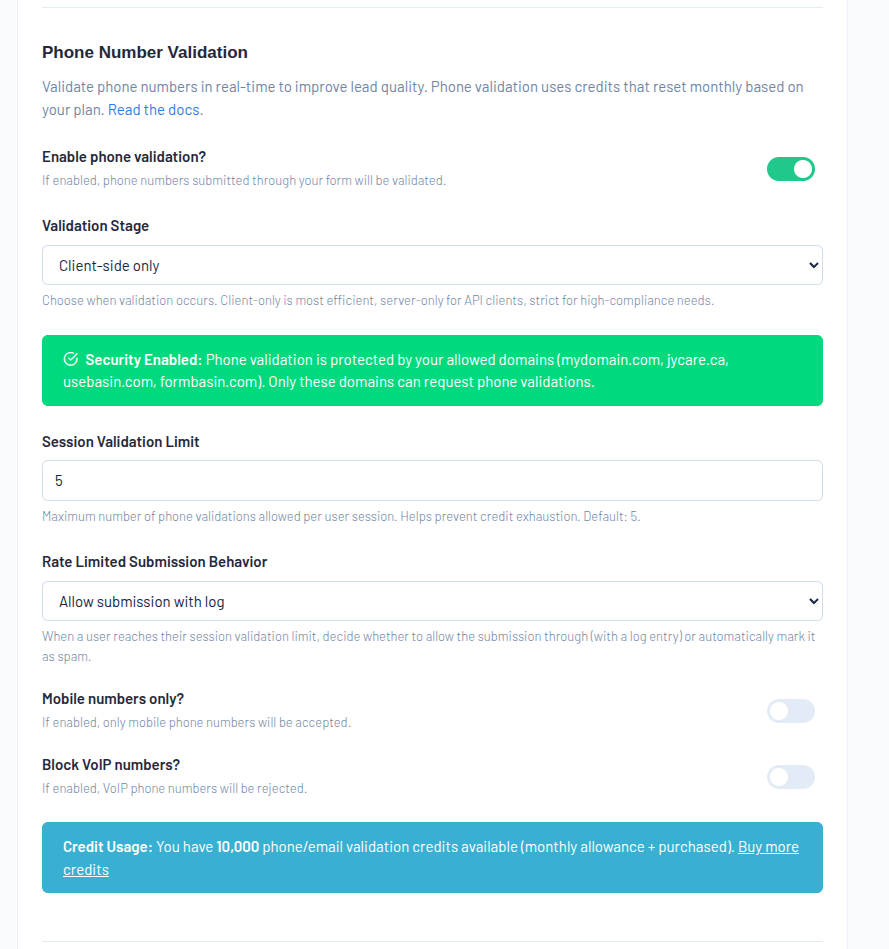
Validation Stage
The validation stage controls when Basin checks submitted phone numbers.
| Stage | Description |
|---|---|
| Client Only | Validation runs in the browser before submission. Can be configured to block submission if the number fails. |
| Server Only | Validation runs on Basin's servers after the form is submitted. |
| Client + Server | Validation runs in the browser first, then again on the server. Provides the highest coverage. |
Server-side validation is a silent check — users do not see a browser-side error. The outcome is determined by your enforcement setting.
Client + Server uses 2 credits per submission
When using the Client + Server stage, Basin runs two separate validation checks — one in the browser and one on the server. Each check consumes one credit, so each submission uses two credits for the phone field.
Client-side validation requires your form to be built with Form Studio or BasinJS. It is not available for plain HTML form backends — use Server Only in that case.
Form Studio
- Open your form in Form Studio
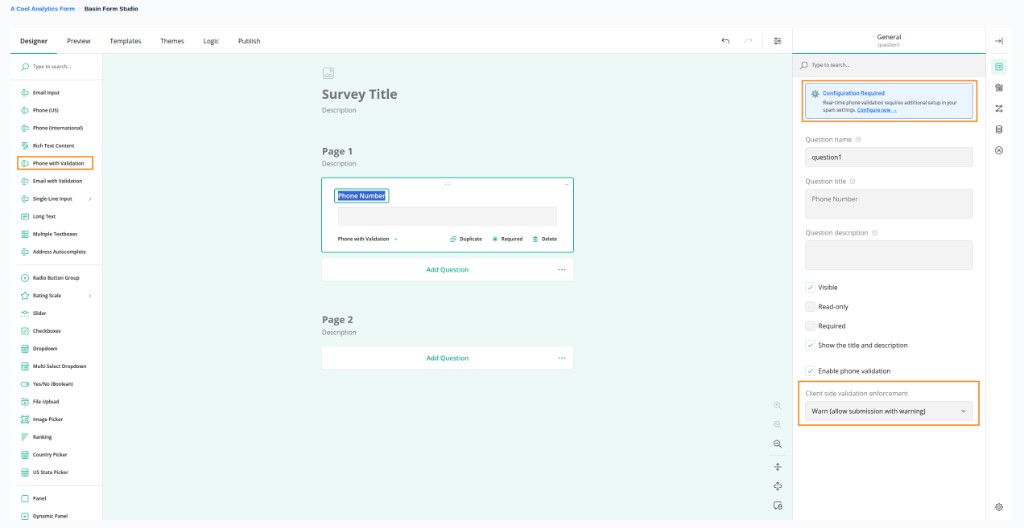
- From the field picker, add a Phone with Validation widget to your form
- Select the field — the settings panel will show an Enable phone validation toggle and a Client side validation enforcement dropdown
- Set enforcement to Warn (flags but allows submission) or Block (prevents submission on failure)
- For full settings — validation stage, mobile-only, block VoIP, and more — go to Form → Settings → Spam
BasinJS
BasinJS 2.11.0 Required
Phone validation requires BasinJS 2.11.0 or later. See the BasinJS docs for installation and upgrade instructions.
Add the data-basin-phone-validation attribute to any phone input inside a Basin-managed form. Set the value to your desired enforcement mode:
<form action="https://usebasin.com/f/YOUR_FORM_ID" data-basin-form>
  <input type="tel" name="phone" data-basin-phone-validation="warn">
  <button type="submit">Submit</button>
</form>
| Mode | Behavior |
|---|---|
warn (default) |
Shows a warning for invalid numbers but still allows submission. Warning details are forwarded to the server. |
block |
Shows an error and prevents submission until the number passes or the validation service is unavailable. |
Validation fires as the user types (debounced) and again on blur. In block mode, Basin JS also checks the result on submit and prevents submission if the number is invalid.
Basin JS inserts an inline feedback message after the input. In block mode, the input also receives the class basin-phone-invalid for CSS styling. Multiple phone fields on the same form are each validated independently.
If the validation API is unreachable or rate-limited, the field is treated as valid so submission is never blocked.
Client-Side Validation Is Not a Security Boundary
Always enable server-side validation for enforcement that matters. Users can disable JavaScript or intercept requests.
Enforcement
Server-side enforcement controls what happens when a number fails validation.
| Enforcement | Behavior |
|---|---|
| Warn | The submission is accepted but flagged in the Basin dashboard for review. |
| Block | The submission is rejected and marked as spam. |
Use Warn when you want visibility into invalid numbers without risking false rejections. Use Block when data quality is critical and you are confident in your setup.
Mobile-Only Filter
Pro Plan and Above
The Mobile-Only and Block VoIP options require the Pro plan or above.
When enabled, Basin rejects any number that is not identified as a mobile line type. This is useful for forms where a mobile number is specifically required, such as SMS follow-up workflows.
Block VoIP
When enabled, Basin rejects numbers identified as fixed VoIP or non-fixed VoIP lines. This blocks virtual numbers from services like Google Voice, Skype, and similar providers commonly used to bypass phone validation.
Rate Limiting
Session Validation Limit
Set a maximum number of phone validation attempts per user session. This prevents abuse where a user tries many numbers in quick succession.
Rate-Limited Behavior
Controls what happens when a session exceeds the validation limit:
| Option | Behavior |
|---|---|
| Allow with Log | The submission is accepted and the rate limit event is logged. |
| Mark as Spam | The submission is marked as spam. |
Credits
Each phone number validated consumes one credit from your shared validation pool. Monthly credits are used first; purchased credits are drawn on once your monthly allowance is exhausted.
If credits run out mid-month, phone validation will stop checking numbers and Basin will notify you by email. See Validation Credits to purchase more or configure auto top-up.
Related Features
- Email Validation — verify email addresses using the same credit pool
- Validation Credits — manage your monthly allowance and purchase additional credits
- Advanced Spam Filters — complement validation with content and geographic filters